


BEST VPN SERVICES



Plex has become a popular media server platform, allowing users to stream their personal movie, music, and TV show collections seamlessly. But with its convenience comes important questions: Is Plex safe to use, and is it legal? While Plex itself is a legitimate service, how you use it—especially when accessing third-party content—can raise security and legal concerns. This article explores the risks, privacy issues, and potential legal pitfalls you should know before diving in.
Despite its user-friendly interface and official partnerships with major studios, Plex’s open-ended functionality can sometimes blur the lines of legality. Some users exploit plugins, unofficial servers, or pirated media, putting themselves at risk of malware, data breaches, or even legal action. We’ll break down the key warnings, safety measures, and best practices to ensure you’re using Plex responsibly—without compromising your security or breaking the law.
Let’s get to it!
What is Plex?
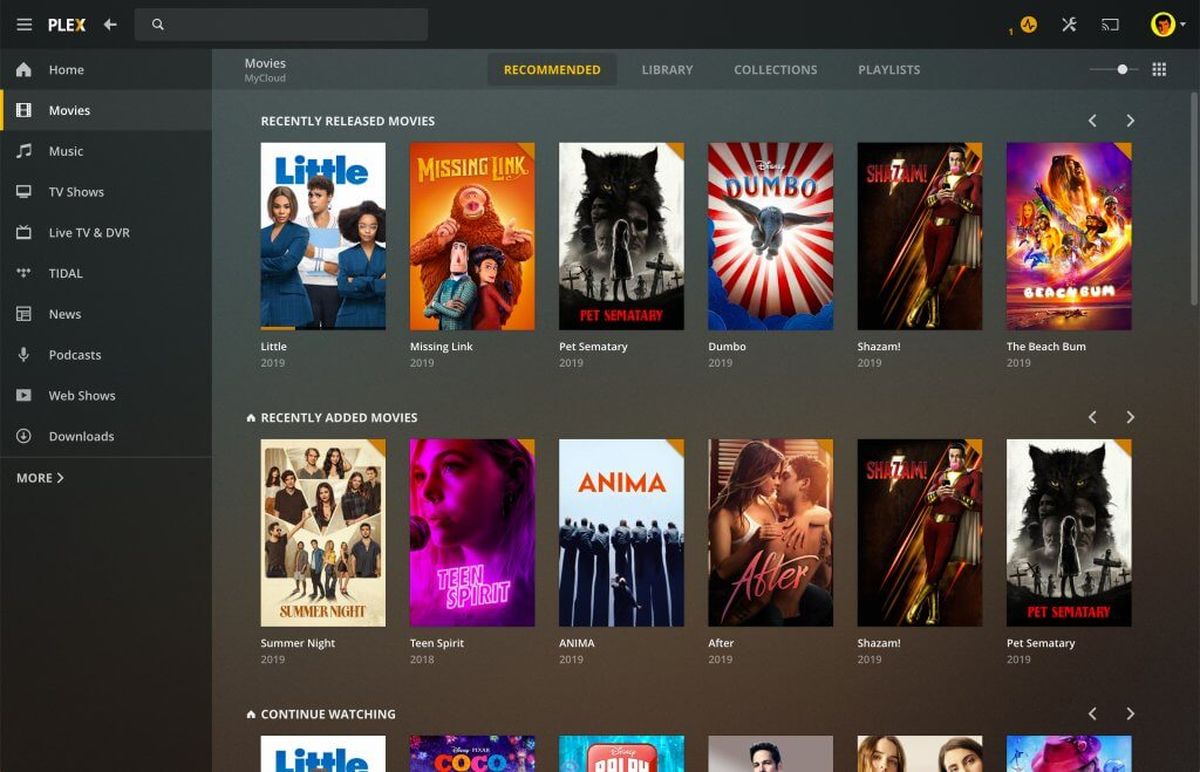
Plex is a hybrid media platform that combines local media streaming with free, ad-supported content from the web. At its core, it allows you to turn your computer, NAS, or server into a personal Netflix. You can organize your files (like movies, TV shows, music, or photos) into a sleek interface that’s accessible across all your devices.
Where Plex stands out is in its flexibility: you’re in control of your content, your library, and even how others access it. Also, you can share your Plex server with friends, stream remotely while traveling, or set it up in the cloud for 24/7 access. Plex is technically legal, but the moment you start sharing your server with strangers or loading it with pirated movies, you’re dancing on thin ice.
The worst part is that a misconfigured Plex server is like leaving your front door wide open in a shady neighborhood. Also, even while you’re streaming home videos, the company still logs what you watch (yep, local files too). Their privacy policy admits it—they use your data for ads and “recommendations.” And if you’ve installed third-party plugins like WebTools? Congrats, you might have just invited malware to the party.
Although Plex encrypts your connections with HTTPS, it harvests metadata about your server, what you watch, how often, and on what device. If you’re already planning to Rip your Blu-rays to Plex? Fine. However, that “shared library” full of the latest Marvel movies, is a lawsuit waiting to happen. Just know that Plex Inc. won’t protect you if copyright lawyers come knocking.
Is Plex Safe?

When it comes to enjoying our favorite media, safety is a paramount concern, and Plex understands this. The platform is designed with various features and settings to ensure a secure viewing experience. However, like any online service, users must be mindful and take proactive steps to protect their data and privacy. Plex employs industry-standard security measures to safeguard your personal media library.
With secure connections and privacy settings, users have the control to determine who has access to their content. It’s essential to keep your Plex server updated, as regular updates not only introduce new features but also address any potential security vulnerabilities. While Plex itself is a secure platform, the safety of your media content also depends on how it’s obtained and managed.
It’s advisable to source content from reputable and legal channels, ensuring that your media library is free from malicious content that could harm your device or compromise your personal information. In addition to these precautions, users can enhance their Plex experience by implementing strong, unique passwords and enabling two-factor authentication where available. These simple yet effective steps go a long way in fortifying your Plex account, providing an additional layer of security.
Safety Risks: What You Should Know

Plex is powerful, but that flexibility can open up security holes if you’re not careful. As you’re organizing your 4K movie collection, your server might be yelling hack me! to the entire internet. This would be your situation if you skip setup best practices. Here’s a breakdown of the actual risks associated with using Plex:
1. Your Plex Server is a Hacker Magnet (Hint: It’s Port 32400)
Plex uses port 32400 for remote access by default. With improper server configuration, it can become visible to the internet. For instance, there have been times when Shodan indexed over 443,644 exposed Plex servers, many with insufficient protection.
What to do:
- Turn on strong passcodes and two-factor authentication (2FA).
- Use a VPN or reverse proxy with authentication for remote access.
- Conduct regular audits of open ports within your network.
2. Historical Vulnerabilities
Plex has faced some serious bugs in the past. One such example: CVE-2020-5741: A remote code execution (RCE) vulnerability that permitted attackers to run code on vulnerable servers.
Why it matters:
Without regular updates to your Plex Media Server, you leave yourself open to known exploits.
3. Privacy Concerns & Metadata Sharing: Plex is Watching You
Even though Plex encrypts your streams via HTTPS, your metadata (like what you watch, when you watch, and with whom) can still be logged or shared. For example:
- By default, the ‘Discover Together’ feature automatically reveals your viewing activity with friends.
- Third-party trackers for targeted ads are involved in the free ad-supported streaming section.
How to lock it down:
- Log into app.plex.tv through a web browser.
- Select your profile picture in the top right of your screen.
- Select view profile > Edit profile.
- Select “Manage who can see your activity.”
- Make sure all options are set to private.
If you’re using Plex’s ad-supported content, use tracker blockers like uBlock Origin. Check Plex’s privacy policy to see what data is kept or shared. If you understand and actively manage these risks, you can enjoy Plex securely without putting your data or devices at risk.
Is Plex Legal?

Navigating the legal landscape of online streaming can be tricky, and when it comes to Plex, understanding its legality is crucial. Plex, as a platform, operates entirely within the bounds of the law, providing a legitimate service for organizing and streaming your personal media content. However, the responsibility ultimately falls on the user to ensure that the content they upload and share complies with copyright laws.
Plex allows users to create their own media server, which means the content is sourced and uploaded by the user themselves. It’s essential to own the rights to the content or have permission to use it. Distributing copyrighted material without authorization is a violation of copyright laws and can lead to severe consequences. It’s also worth noting that Plex offers official channels and plugins, providing access to a wide array of legal and authorized content.
Utilizing these official channels ensures that you’re on the right side of the law, enjoying your favorite media without any legal concerns. While Plex does not monitor the content uploaded to personal servers, it’s imperative for users to be mindful of what they share and distribute. Respecting copyright laws and only uploading content you have the right to use will ensure a legal and hassle-free experience on Plex.
Best VPNs for Plex
VPNs not only enhance security by encrypting your internet connection but also offer the freedom to access content from various regions without geographical restrictions. For Plex users, this means an added layer of protection and an expanded library of content at your fingertips.
- NordVPN: A premium VPN with top-tier security, fast speeds, and a massive global server network.
- Surfshark: A budget-friendly VPN offering unlimited device connections and strong privacy features.
- Proton VPN: A privacy-first VPN with strong encryption, a strict no-logs policy, and a free plan.
1. NordVPN

NordVPN stands out as a robust VPN service, boasting a vast network of 7,400 servers across 110 countries. This extensive server range ensures that users can connect to a server close to their location, providing a fast and stable connection.
NordVPN is the most ideal VPN to keep your Plex account safe from bad actors. Its privacy and speed performances are top-notch. With NordVPN’s obfuscated servers, you can avoid ISP blocks and strict firewalls. Set up NordVPN Meshnet to create a tunnel between your Plex server and any remote devices.
- NordVPN is the industry leader (by a long way)
- 30-day risk-free trial
- Superfast speeds
- 7,300+ servers in 115+ countries
- Strict no-logs policy
- Next-generation military-grade encryption
- DoubleVPN, double privacy
- 10 simultaneous device connections
- Great for: Safety, security, anonymity & peace of mind
- Compatible with: Windows, Mac, Android, iPhone, iPad & iOS, Linux, routers, Apple TV, FireFox, Google Chrome, Microsoft Edge, and more
With NordVPN, Plex users can enjoy their media content securely, knowing that their connection is encrypted and their data is protected. The VPN service also offers features like a kill switch and DNS leak protection, further enhancing the security of your Plex experience.
Whether you’re streaming at home or accessing your Plex server on the go, NordVPN provides a secure and seamless connection. In addition to its security features, NordVPN also excels in bypassing geographical restrictions.
This is particularly beneficial for Plex users who want to access content that may not be available in their region. With just a few clicks, you can connect to a server in a different country and enjoy a world of content without limitations. NordVPN’s user-friendly interface and reliable performance make it a top choice for enhancing your Plex experience.
2. Surfshark VPN

Surfshark VPN, with its impressive network of 3200 servers in 99 countries, offers Plex users a reliable and secure connection. The VPN service is known for its speed and ability to maintain a stable connection, ensuring that your streaming experience is uninterrupted.
- Surfshark is the best budget VPN
- 30-day risk-free trial
- Strict no-logs policy
- 3200+ servers in 100 countries
- Unlimited simultaneous device connections
- Great for: private browsing on a budget
- Compatible with: Windows, Mac, Android, iPhone & iOS, Linux, FireFox, Google Chrome, Microsoft Edge, and more
Surfshark VPN also prioritizes user privacy, employing strong encryption and a strict no-logs policy to keep your online activities confidential. One of the standout features of Surfshark VPN is its ability to connect to multiple devices simultaneously. A budget-friendly choice for unlimited simultaneous connections. Surfshark is mostly ideal if multiple people want to access Plex remotely. It comes with CleanWeb, a feature that blocks ads and trackers while you’re streaming.
This flexibility is a significant advantage for Plex users who access their media server across various devices. With Surfshark VPN, you can ensure that all your connections are secure, regardless of the device you’re using. Additionally, the VPN service offers features like CleanWeb, which blocks ads and malicious content, further enhancing your online safety.
3. Proton VPN

Proton VPN, with its network of 9500+ servers in 110 countries, offers a streamlined and user-friendly VPN experience. The service is designed to be accessible, even for those who are new to VPNs, making it a great option for Plex users looking to enhance their security and accessibility.
Proton VPN provides reliable encryption and a secure connection, ensuring that your Plex streaming is private and protected. Proton VPN also stands out for its commitment to user privacy and security. The service offers a data breach monitor, alerting users if their personal information is compromised.
For Plex users, this feature adds an extra layer of security, ensuring that your digital presence is safeguarded. With its user-friendly interface and reliable performance, Proton VPN is a solid choice for enhancing your Plex experience. Renowned for privacy-first architecture and no-logs policy. ProtonVPN offers free servers but with speed limits. Its paid version lets users enable Secure Core for additional anonymity in traffic routing.
Pro Tip: If your VPN offers port forwarding (as some ProtonVPN plans do), it’s even possible to host Plex remotely via a secure VPN tunnel and skip any router configuration altogether.
Legal Considerations: What’s Allowed and What’s Not?

Plex itself isn’t illegal, but actually, what you do with it is what matters. However, the platform treads a dangerous line between personal media organization and possible copyright infringement. Here’s what you should know before you upload that massive movie library:
1. Self-Hosting vs. Pirated Content
Plex doesn’t house any files for you, it just provides you with the tools to stream your own content. That’s legal. Nonetheless, you maintain all legal risks if you are uploading ripped or downloaded copyrighted films, that you don’t own rights to.
- In the U.S., this might lead ISPs to send out DMCA takedown notices.
- Subsequent violations may result in a penalty of fine.
Pro Tip: If flagged, you’ll want to erase any questionable content from your server using Plex’s built-in Takedown tool (under Library tools)
2. Plex’s Terms of Service
Plex explicitly prohibits illegal conduct on its platform: The Terms of Service makes clear that no users may use Plex to “violate the intellectual property rights of others.” Enforcement, though, is user-dependent, because, Plex doesn’t actively monitor private libraries. However, they will respond to legal complaints if they’re filed.
3. Privacy and Data Sharing Efforts Globally
Some of your data may still be shared with advertisers if you’re using Plex’s free streaming tier in the EU. This includes licensed, ad-supported content.
- This is important under GDPR, which asks for transparency and user consent.
- Plex’s Privacy Settings lets you opt out of personalized data usage.
Go to your Plex Privacy Preferences and uncheck the box under “Optional Playback Data” labeled “Send playback data to Plex”, particularly if you live in a GDPR-covered region. As the saying goes: With great power comes great responsibility. Whether it’s about home videos with family or ripping your Blu-ray collection, know where the line is, and stay on the right side.
Alternatives to Plex: Private, Powerful, and Safer?

Plex may be a popular media server, but it’s not the only game in town. Moreover, if privacy, security, or control are among your top priorities, it may not even be your choice server. Here’s a rundown of solid alternatives and how they compare to Plex:
1. Jellyfin – 100% Open Source and Privacy-First
No Telemetry or Tracking
Jellyfin doesn’t collect any user or usage logs, unlike Plex. Everything, including media, remains on your server, never communicating with other servers.
Fully Self-Hosted
There’s no cloud component. You get full control, from where you store data to who accesses it. It’s great for privacy purists and offline setups.
Customizable and Free
Community-driven and open-source, not premium. However, it misses some of the polish of Plex and built-in mobile app support.
2. Emby – Feature-Rich with Enterprise-Level Security
Local Hosting with Optional Cloud Sync
Its setup is completely configurable, as you have the option of running Emby solely over your local network and adding cloud sync features to stream on the go.
Support for Hardware Transcoding
You get logs, access audits, and fine-grained transcoding control via built-in tools. This is useful if you’re streaming high-resolution content, or serving multiple users.
Enterprise-Style Security
Emby has support for advanced controls like LDAP authentication, role-based user permissions, and audit logs of who accessed what. It’s ideal for small businesses or family networks.
3. Kodi – Flexible but Risky When Misused
Local Playback Champion
Kodi is a media player and not a full-blown server. It’s really nice for those single-device libraries, particularly if you’ve got an Android TV or a Raspberry Pi.
Warning: Third-Party Add-ons (Exodus, etc.)
A lot of its users cross over into piracy territory by way of plugins such as Exodus or The Crew. These add-ons stream from unauthorized sources and open their users up to malware, DMCA notices, or ISP throttling.
Overlooked Essentials for Safe and Ethical Plex Use
Even after all the safety, legality, and mitigation, there are still important gaps users should fill.
Ethical Hosting Practices
Plex is not a license to pirate. If you’re building a personal library, only use the content you have acquired legally:
- Rip your own DVDs or Blu-rays using (MakeMKV) — perfect for maintaining a physical collection.
- Use Handbrake to produce space-efficient, stream-compliant files without losing quality.
Security Audits & Vulnerability Checks
Your Plex server will only ever be as secure as your tools. Never trust default settings:
- Scan for outdated plugins or OS-level vulnerabilities by executing [PlexPatrol] or [Vuls]
- Periodically review your system’s open ports (especially 32400) and plugin versions.
In this example, a Reddit user lost access after a Plex server was compromised. Keep plugins updated monthly.
Encrypted Backups Against Ransomware
Media libraries can take years to put together, so don’t lose them overnight to ransomware or accidental deletion:
- Back up your Plex media to cloud storage (Google Drive, OneDrive, etc.) with Rclone with encryption enabled.
- Schedule regular backups or use a Cron Job as a safety net. Schedule a task for regular backups, either daily or weekly.
Bonus Enhancements & Tools
Do you want to improve your Plex setup while preventing data leaks?
- Disable Telemetry: Use [Pi-hole] or [NextDNS] to block domains such as plex. tv and metrics. plex. tv if local-only usage is what you’d prefer.
- Monitor Plugin Safety: Bookmark GitHub repositories or developer sites like r/Plex for known plugin vulnerabilities and changelogs.
Quick Table to Compare the Risks
| Feature / Platform | Plex | Jellyfin | Emby |
| Data Privacy | Collects metadata | No telemetry | Partial (cloud sync) |
| Encryption | HTTPS + TLS | User-controlled SSL | SSL + Audit options |
| Third-Party Plugins | Many (some outdated) | Community vetted | Fewer, but closed |
| Default Port Risks | 32400 exposed | Configurable | Restrictable |
FAQs
What Steps Can I Take to Ensure My Plex Account is Secure?
Ensuring the security of your Plex account involves a combination of utilizing Plex’s built-in security features and adopting good cybersecurity practices. Always ensure your Plex server and apps are up to date, as updates often include important security enhancements. Use strong, unique passwords for your Plex account and enable two-factor authentication if available. Be cautious about who you share your Plex server with and adjust your server’s sharing settings to limit access to your content.
Is It Necessary to Use a VPN with Plex?
While using a VPN for Plex is not necessary, it can enhance your streaming experience by providing additional security and privacy, especially when accessing your Plex server over public Wi-Fi. A VPN also allows you to bypass geographical restrictions, potentially giving you access to a broader range of content. However, it’s important to choose a reputable VPN service and understand the legal implications of bypassing content restrictions in your country.
How Can I Legally Obtain Content for My Plex Server?
To ensure that the content on your Plex server is legal, you should only upload media that you own or have the right to use. This can include content you’ve purchased, home videos, or media from authorized services. Avoid downloading or sharing copyrighted material without permission, as this could lead to legal consequences. Additionally, you can explore Plex’s official channels and plugins, which provide access to a wide array of legal and authorized content.









