BEST VPN SERVICES



If you think it’s illegal to bypass a firewall, no doubt, you’re right. But if you’re looking to access revolutionary content with restrictions for good reasons, then this is for you. Let’s say you’re a developer debugging a project, and midway, you find APIs blocked by corporate networks.
It’s safe to bypass the firewall for successful debugging. Besides tech-related purposes, activists can boycott and circumvent government firewalls during protests to pass sensitive but important information. Normally, firewalls serve as shields on the internet, blocking malware, cyberattacks, and hackers.
So, why override it? Well, we believe your motives are good, so we compiled 8 effective ways to bypass firewalls easily, along with important legal and ethical considerations to keep in mind.
So, let’s dive right in!
What Is a Firewall?
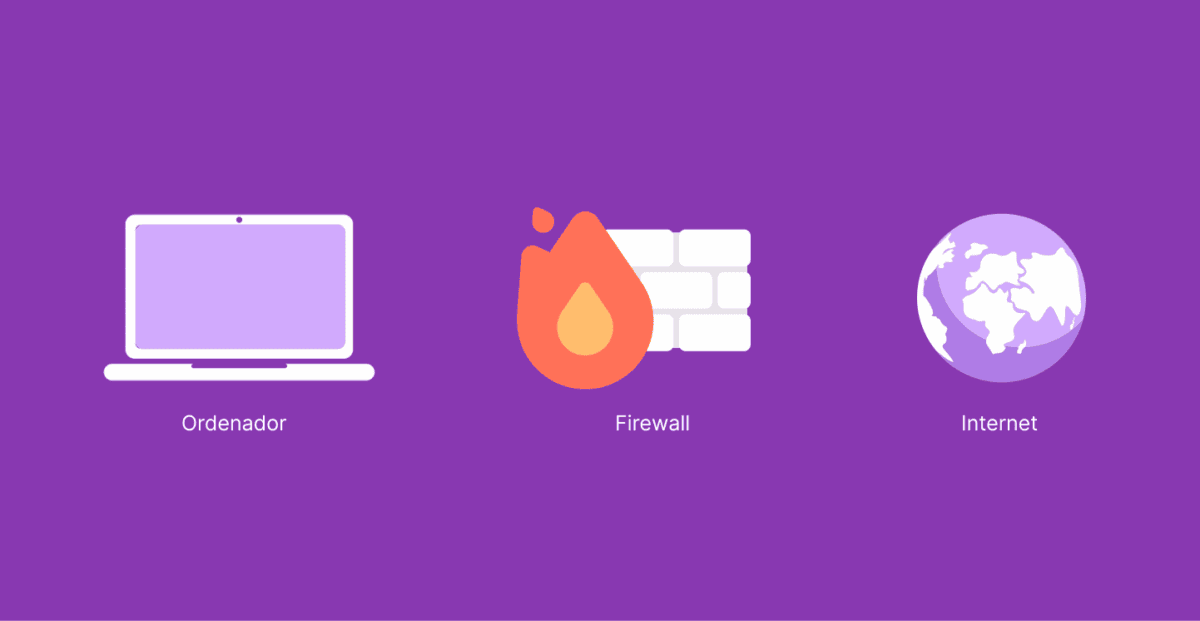
A firewall is the last line of defense for companies and countries against attacks on their networks. Through a series of rules, firewalls keep out malicious traffic without infringing upon user privacy or bandwidth. They can either be software, hardware, or, depending on your needs, but protect yourself from viruses; you need one installed!
A firewall can protect an individual’s computer as it protects and monitors web traffic on a larger scale. A firewall does this by blocking or filtering data packets from entering your device, which helps to prevent malicious code from infecting other systems not protected with firewalls.
Types of Firewalls

The subsequent section of this guide will provide the effective steps to bypass any restrictions from a firewall while surfing the internet. However, the success rate may vary depending on the technology of the firewall in question.
Wondering how many types of firewalls exist? There are quite a number, but the most frequently used are packet filtering, proxy, cloud, stateful inspection, and next-generation firewalls.
Let’s quickly explain!
1. Packet Filtering Firewalls
These types inspect incoming and outgoing data packets, checking details like source/destination IP addresses, ports, and protocols (e.g., TCP, UDP). If a packet matches a blocked rule (e.g., an unauthorized port or suspicious IP), the firewall drops it. Only safe packets are allowed through. Also, if you try to access a website on a restricted port (like port 23 for Telnet), the firewall blocks it unless explicitly permitted.
2. Proxy Firewalls
Instead of direct communication, this firewall acts as a middleman. When you request a website, the proxy first evaluates the request, then forwards it if safe. It filters traffic at the application layer (e.g., HTTP, FTP), blocking malicious content like malware-infected downloads or suspicious app traffic. In other words, if you download a file, the proxy scans it for threats before it reaches your device.
3. Cloud Firewalls
These types are hosted in the cloud and protect online services, virtual servers, and cloud-based apps. How? By filtering traffic before it reaches the network. They scale dynamically, blocking DDoS attacks or unauthorized access to cloud storage (like AWS S3 buckets). For instance, if a hacker tries to brute-force a cloud database, he gets blocked by the firewall’s rate-limiting rules.
4. Stateful Inspection Firewalls
Unlike basic packet filters, these track active connections (e.g., ongoing web sessions). They remember past packets to detect anomalies. If a packet doesn’t match a known connection (e.g., a sudden inbound reply without a request), it’s blocked. For instance, if you’re streaming a video, the firewall ensures only legitimate data from that session passes through.
5. Next-Generation Firewalls (NGFWs)
This type combines traditional firewall features with deep packet inspection (DPI), intrusion detection/prevention (IDS/IPS), and app-aware filtering. As such, it blocks sophisticated threats like encrypted attacks or unauthorized app usage. This could be why your Skype was blocked in a corporate network.
In other words, if malware hides in an SSL-encrypted connection, the NGFW decrypts and scans it before allowing passage. Despite all these security technologies and protocols, firewalls can still be bypassed since they are also software programs. Without further ado, let’s explore the various ways you can do that.
Why Override a Firewall?
Firewalls serve as essential security barriers, but there are legitimate reasons why developers, IT professionals, and ethical hackers may need to override them. One common reason is whitelisting, where developers request firewall exceptions to allow APIs and webhooks to communicate with external services. Many enterprises maintain strict outbound and inbound rules, so obtaining approvals for whitelisting is a crucial step in enabling seamless application functionality.
In penetration testing, security experts use ethical hacking tools to evaluate firewall defenses. For instance, Metasploit’s firewall evasion modules can simulate attacks to identify weaknesses. Additionally, Burp Suite is commonly used to test firewall rules during web application penetration testing, ensuring that security configurations are robust.
For hybrid cloud environments, enterprises may need to bypass on-premises firewalls securely. One effective method is leveraging Azure Relay, which enables secure communication between cloud-based applications and on-premise resources without exposing sensitive infrastructure to the internet.
How to Bypass Firewalls
Follow each of the steps carefully to avoid shattering your firewalls and opening the back door of your internet to malicious users.
1. Use A VPN Service
A Virtual Private Network (VPN) allows you to access blocked content by encrypting your traffic and routing it through a remote server. It’s effective for bypassing restrictions imposed by network firewalls and Internet Service Providers (ISPs). However, many modern firewalls can detect and block standard VPN traffic by analyzing patterns like unusual port usage or encryption protocols.
To counter this, advanced VPNs like NordVPN use stealth techniques to disguise their traffic as regular internet activity.
- NordVPN is the industry leader (by a long way)
- 30-day risk-free trial
- Superfast speeds
- 7,300+ servers in 115+ countries
- Strict no-logs policy
- Next-generation military-grade encryption
- DoubleVPN, double privacy
- 10 simultaneous device connections
- Great for: Safety, security, anonymity & peace of mind
- Compatible with: Windows, Mac, Android, iPhone, iPad & iOS, Linux, routers, Apple TV, FireFox, Google Chrome, Microsoft Edge, and more
The VPN offers obfuscation technology, which masks its traffic to look like normal HTTPS traffic (used by secure websites). This prevents deep packet inspection (DPI) from identifying and blocking the VPN connection. It uses tools like Shadowsocks and V2Ray to further obscure VPN traffic by wrapping it in TLS encryption (the same used by HTTPS websites).
As a result, the VPN data appears as ordinary web browsing, bypassing firewalls that block OpenVPN or WireGuard protocols. Moreover, most firewalls allow traffic on port 443 (used for HTTPS). Thus, by configuring OpenVPN to run on TCP port 443, NordVPN’s traffic mimics standard secure web traffic and becomes harder to detect and block. So, how do you bypass a firewall? Here’s how!
Go Pro on Your VPN
This will unlock all of the features, like the ones mentioned above. If you’re using NordVPN as recommended, a monthly fee ranging from $3.09 per month to $14.99 per month is charged.
Connect Your Device
If you’re using Windows, go to ‘Settings,’ click on ‘Network and Internet’ and select the ‘VPN’ tab. Click on ‘Add a VPN Connection’ and input the required details. For Mac users, press the ‘Apple menu’, click on ‘System Preferences’, select ‘Network,’ and click on the ‘+’ sign at the lower left section of your screen. Tap on the ‘Interface’ drop-down and select ‘VPN.
For mobile users (Android and iPhone), launch your ‘Settings’ app and type in ‘VPN’ to quickly locate it. Select ‘Add VPN’ and input the details required. After that, save your VPN configurations and switch the toggle button to enable the service, and you’re good to go!
2. Use A SOCKS Proxy
Unlike HTTP proxies, SOCKS proxies work at a lower level, handling all types of traffic without modifying data. However, public ones come with security and performance risks, such as exposure to data interception, slow speeds, and potential logging by malicious hosts.
For secure and self-hosted options, consider deploying Privoxy or Squid Proxy on a VPS. These allow encrypted, controlled traffic routing, reducing the risks associated with public proxies. Alternatively, Cloudflare Argo Tunnel provides a secure way to bypass firewalls without exposing your IP address, ensuring encrypted end-to-end connections.
3. Turn Off the Firewall Service (Device-Based Guide)

Disabling a firewall can sometimes be an option to bypass restrictions, though it’s risky and often not recommended.
Windows
- Open Command Prompt as Administrator.
- Disable the firewall with this prompt: netsh advfirewall set allprofiles state off.
- To re-enable, use this prompt: netsh advfirewall set all profiles state on.
Linux
- Check firewall status: sudo ufw status.
- Disable firewall: sudo ufw disable.
- Re-enable: sudo ufw enable.
macOS
- Disable firewall: sudo /usr/libexec/ApplicationFirewall/socketfilterfw –setglobalstate off.
- Re-enable: sudo /usr/libexec/ApplicationFirewall/socketfilterfw –setglobalstate on.
4. Use Google Translate

One of the best ways to access websites without getting caught by a firewall is to use Google Translate. To use this tool, you must know how to read in a language other than which the site is written.
Let’s say, for example, there was an English website, and all it did was display content; if I wanted to view what they had on their homepage but don’t speak any languages besides my own, then I would need something like google translate as well because only people who understand more than one language can be able to see what comes up when reading from left-to-right.
5. Use Web Proxies To Access The Web

Web proxies can help you bypass firewalls, but often come with slow speeds and intrusive ads. For a reliable option, Hide.me is recommended for its speed and security.
- Visit hide.me or your preferred proxy site.
- Enter the website URL you want to access.
- Choose a server location and click “Go.”
- Browse as usual, but keep in mind that free proxies may log your activity.
6. Access Your PC Remotely

You can access your home PC remotely using any computer by accessing it through a third-party server. For example, if you suspect somebody is blocking you from certain websites, bypass their firewall and gain unrestricted access to the websites with this method!
7. Use IP Addresses To Access Sites

It’s not uncommon for people to forget how specific sites are accessed. For example, when a computer is made, it automatically assigns an IP address that identifies the server hosting its site.
However, it might be challenging to remember this number to access blocked websites when most firewalls only block domain names from being visited through their browser and allow you to do so by just typing out IPs instead, as long as they don’t have any other security measures on them (such as blocking all internet traffic).
8. Use your Smartphone as a Router (Hotspot)

Firewalls in corporate networks, schools, or restrictive environments work by controlling traffic through the organization’s internet infrastructure. When you connect to the internet via Wi-Fi or an Ethernet connection, your traffic passes through this firewall, which can block websites, services, or protocols based on network rules.
Using your smartphone as a hotspot allows you to bypass these restrictions because it provides a direct internet connection, independent of the local network’s firewall. However, while this method is effective, it comes with potential drawbacks such as data usage limits, slower speeds, and security risks if the hotspot is left unprotected. Notwithstanding, here are the steps to begin with:
For Android Users
- Open Settings on your Android device.
- Go to Network & Internet (or Connections on some devices).
- Tap Hotspot & Tethering.
- Select Wi-Fi Hotspot and turn it on.
- Tap on Hotspot Name and change the network name (SSID).
- Set a strong password for security.
- Change the band options (2.4GHz or 5GHz) if needed.
- On your PC or another device, go to Wi-Fi settings.
- Find and select your hotspot’s name.
- Enter the password and connect.
For iPhone Users
- Open Settings.
- Tap Personal Hotspot (or Cellular > Personal Hotspot).
- Toggle Allow Others to Join to On.
- Tap Wi-Fi Password to set a secure password.
- Change your hotspot name under Settings > General > About > Name.
- Open Wi-Fi settings on your laptop or another device.
- Select your iPhone’s hotspot name.
- Enter the password and connect.
9. Try DNS-over-HTTPS (DoH)
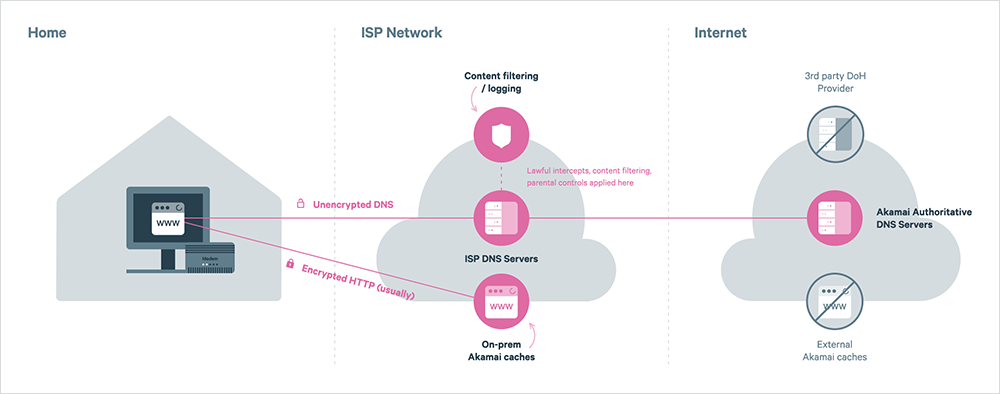
DoH encrypts DNS queries to bypass censorship. The process involves configuring your browser.
For Firefox
- Go to about: preferences#privacy.
- Enable “Enable DNS over HTTPS”.
- Select “Cloudflare” or “Custom”.
On Chrome:
- Open chrome://settings/security.
- Enable “Use secure DNS”.
Linux Command for DNS Tunneling:
- iodine -f -P password dns_tunnel.example.com
10. Try SSH Dynamic Port Forwarding
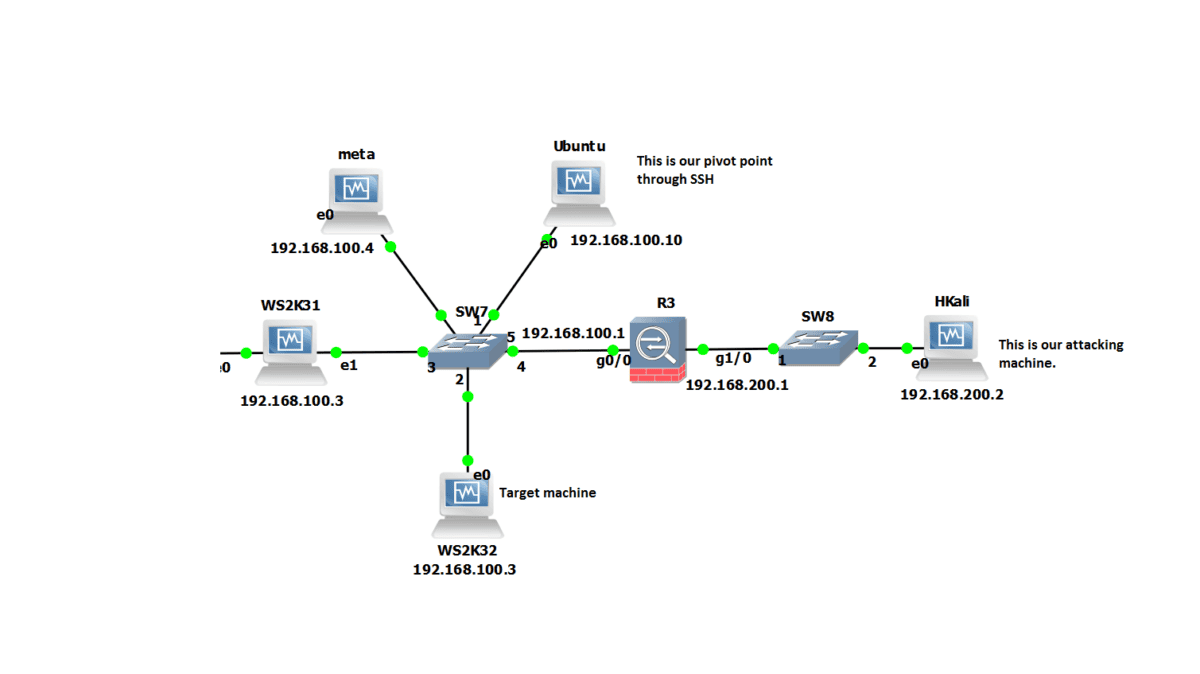
SSH tunneling can help bypass firewalls by creating a SOCKS proxy through an SSH server. Here’s how!
- Open a terminal (Linux/macOS) or PowerShell (Windows). Run the following command: ssh -D 8080 -C -N user@your_ssh_server
- Configure your browser to use localhost:8080 as a SOCKS proxy.
Platform-Specific Enhancements:
- Windows: Use PowerShell to test firewall rules: Test-NetConnection -ComputerName example.com -Port 22.
- Linux: Use iptables to redirect traffic: sudo iptables -t nat -A OUTPUT -p tcp– dport 80 -j REDIRECT– to-port 8080.
- macOS: Use SSH local port forwarding: ssh -L 8080:target:80 user@ssh_server.
- DNS Tunneling on Linux: Exploit DNS-over-HTTPS (DoH): iodine -f -P password dns_tunnel.example.com.
Security Risks and Mitigations
Bypassing firewalls can trigger detection mechanisms that monitor network traffic for suspicious patterns, such as rapid port scanning or unusual connection requests. If flagged, this can lead to network restrictions or even legal consequences. Additionally, improperly configured tools can result in DNS or IPv6 leaks.
As such, your real IP address is exposed, and bypassing attempts to network administrators will fail. To mitigate these risks, use encryption techniques such as dnscrypt-proxy to secure DNS queries. Also, disable IPv6 in your operating system settings to prevent unintended data leaks. What’s more! Always verify that any proxy, tunnel, or VPN solution is properly configured to avoid detection and protect your privacy.