


BEST VPN SERVICES



AirVPN claims to offer unassailable privacy for the technically skilled individuals, but is it safe to use? Our investigation highlighted some quite startling quirks – including a malware flag discovered on its Windows installer (confirmed by Malwarebytes) – that could even make the most privacy-engrossed freak reconsider. Along with a ludicrously heavy interface and limited capabilities for streaming, this is far from a friendly option for beginners.
So, who is it for? If you live for granular traffic stats, dubious protocols, and tunneling across Tor, AirVPN’s niche might just excite you. But if you want a simple, quick, “set it and forget it,” VPN? Walk away now. We tested the service for speed, security, and usability in real life for torrenting, streaming, and in censorship-heavy regions—here is our fair opinion.
Review Summary
While other VPNs may try to persuade you with discounts or flashy features, AirVPN appeals to your better nature by proclaiming itself to be “run by activists and computer hackers in support of internet freedom, anonymity, and against surveillance.” An important security hole is that the Windows installer for AirVPN includes computer viruses.
Also, both users and employees have stated on the service’s website that it cannot be utilized to circumvent streaming service geo-restriction constraints. So, if you are looking for services of the highest quality, this VPN might not be the best; you should consider using NordVPN. To learn more about this service, keep reading our review or download the app right now.
AirVPN Review 2026: Summary

AirVPN At A Glance
AirVPN made its debut back in 2010 as Italy’s answer to internet privacy (when the majority of the public was led to believe VPNs were just for tech nerds). Starting as a free service, AirVPN now signifies something greater, while keeping its free-spiritedness intact. What makes AirVPN stand out? They’re still riding the OpenVPN wave (even though the rest of the world has jumped on the WireGuard wagon). Some might see this as stubbornness – but AirVPN believes it’s dependability! After all, there’s a saying, “if it is not broken, don’t fix it.”
They have invested way more resources into improving their service than many of the other competitors, all the while sticking to what works. The folks behind AirVPN aren’t shy about their mission. They are upfront about their beliefs in hacktivism and anti-censorship. They back it up with detailed technical documentation that would bring security researchers to tears. Need to know how their DNS works? They have a 50-page document for this. But this is where it all gets quirky (and potentially frustrating): AirVPN does not care about streaming.
Accessing US Netflix or BBC iPlayer? We tried every server combination you can think of, and in the end, it was impossible. It’s almost as if they are fine with letting streaming fans look elsewhere, while they reinforce their focus on actual privacy and security. Think of AirVPN as that brilliant but off-kilter professor who knows and loves everything about their course but couldn’t care less about making small talk. The tool will protect your data like it’s their newborn baby, but don’t expect them to help you binge-watch the latest episode of your favorite show. So, who does AirVPN work for?
Privacy purists desiring technical depth, torrent aficionados needing dependable P2P support, and users needing substance, not market frills. Looking for the one VPN that treats security like a religion rather than apologizing for its complexity? You’ve just found your match! Ready to see if AirVPN’s approach works for you? Our comprehensive review breaks down everything from speed tests to security specifications to help you decide whether this Italian privacy fortress is a good fit for you.
Speed
Let’s talk numbers because vague statements have never helped anyone make a decision. Our baseline internet speed started at 100 Mbps down and 35 Mbps up. But here’s what the actual speeds we got were:
- Local Server (Italy): 87 Mbps down, 32 Mbps up, 28ms latency.
- US East Coast: 43 Mbps down, 18 Mbps up, 114ms latency.
- UK Server: 51 Mbps down, 22 Mbps up, 89ms latency.
- Singapore Server: 38 Mbps down, 15 Mbps up, 142ms latency.
Honestly, for the distant servers, that’s a pretty harsh drop off – about 50-60% of your original speed. If you’re streaming a 4K video or doing a large download, then possibly that might be a deal breaker. A quick reality check: Is this speed acceptable for your needs? If you are just browsing and checking emails, it would be fine. But if you intend to torrent large files or stream Netflix in Ultra HD, then you may want to look for other options.
Ease Of Use
Let’s break down what you see when you first open the AirVPN interface. In the main layout are five basic tabs.
- Servers Tab: This is going to be your connection tab. You can sort by country, speed, or load. The green/yellow/red indicators show you the health of the server. Stick with green for best performance.
- Statistics Tab: This gives you live data about your connection. Your current IP, data transfer, session duration, etc. There will be live updates, so sometimes it may get distracting to focus on the numbers.
- Logs Tab: This is the technical information about your connection. If you are not troubleshooting your connection, you can probably completely ignore this.
- Settings Tab: This is where you customize the program. This is where you will set up your kill switch (airVPN calls it “Network Lock”), DNS, and startup preferences.
- Speed Tab: This gives you constant updates on the speed of your connection, updating every few seconds. It is an easy visual way to see if your speed may be dropping, or if a server seems to be having problems.
Overall, the interface feels like it was designed by engineers for other engineers. This is good if you are more technical and want to get your hands on the nitty-gritty details. However, if you are on the newer side of things, the many blinking numbers may seem overwhelming and confusing.
Security
The good news is that AirVPN encrypts your traffic in military-grade AES-256 encryption using OpenVPN (UDP/TCP). We put AirVPN through the wringer with a series of leak tests to verify their claims – here’s what we did:
- DNS Leak Tests: We used DNSLeakTest.com, IPLeak.net, and BrowserLeaks.com. All results showed AirVPN’s DNS servers, and there were NO requests leaking to our ISP’s DNS servers, so that is a definite pass for us.
- IP Leak Tests: We did a couple of WebRTC, IPv6, and standard IP leak tests. Results were all clean, meaning your real IP is NOT leaking out at all. That’s exactly what any user would want.
- Kill Switch Test: We disconnected our VPN connection manually while downloading a torrent. And upon disconnecting, the Network Lock feature was engaged immediately, disabling the capability and blocking all traffic until we reconnected. This is essential for those users who torrent.
Now, back to that odd routing issue we noticed – when connecting to the New York server, our traffic took a scenic route through Europe before arriving in the US. This is not necessarily an “AirVPN” issue (sometimes ISPs have super messed up routing). We just thought it was odd, since we can go from Toronto to New York without passing through 3 countries. This can’t help speed, and may raise some eyebrows for users who are focused on privacy.
Server Coverage Comparison

Let’s be realistic here. 237 servers in 20 countries isn’t just small, it’s microscopic compared to a VPN like NordVPN (which has over 7,000 servers in 100+ countries) or ExpressVPN (which has over 3,000 servers in 105+ countries). AirVPN has grown from 80 servers last year, but even now, with 237 servers active, it is difficult to imagine this expansion as adequate for users. This is like considering an added sprinkle on top of a cupcake when users needed a whole bakery.
So, why does this matter to you? With fewer servers, you are more likely to experience the following problems:
- A greater chance of server congestion (slower speeds).
- Limited geo-unblocking options.
- Fewer IP addresses to choose from. This means you will likely struggle when streaming, and with a limited number of IPs, it’s easier for streaming services like Netflix to blacklist you.
- Potential connection failures during peak hours.
Is that a deal-breaker? Not quite. Quality beats quantity, and AirVPN has some of the best-maintained servers. Even so, limited coverage may be frustrating if you’re looking for servers in certain countries or backup options.
Compatibility

AirVPN has most of the bases covered, but don’t expect it to work on everything you might have in your kit.
- What is supported: It has dedicated apps available for Windows, macOS, Linux, Android, and iOS. You can also set it up manually on several different brands of routers, which is great for securing your whole home network (including that smart TV you’re watching Netflix on).
- What it doesn’t have: AirVPN has no support for PlayStation or Xbox gaming consoles, and no support for streaming devices like Roku, FireTV, or Apple TV. If you want to get these devices covered by VPN, you can get that done by setting it up through your router – doable, but not nearly as easy as plug and play.
The interesting twist here is that AirVPN works with the Tor network, which many service providers block. This means that not only do you get pretty good privacy protection from AirVPN itself, but if you use Tor as a front end, you can bump up your privacy. But you will have a pretty heavy hit on connection speed.
Bottom line: AirVPN has the essentials for both desktop and mobile platforms. Supported router configurations complete most things AirVPN doesn’t cover, although this means you will require some tech know-how to make it work for smart TVs or gaming consoles.
Bypassing Censorship

AirVPN’s censorship circumvention tools sound more like a hacker’s paradise: OpenVPN over SSL/SSH tunneled, VPN-over-Tor, even port forwarding for advanced evasion. In theory, these should be able to determine whether the VPN traffic is disguised as benign HTTPS traffic or tunneled within an SSH shell. In reality, using them feels like diffusing a bomb by following YouTube video tutorials. Here is where it gets tricky:
- Obfuscation Requires Surgery: There isn’t a “Stealth Mode” button. To get around Turkey/Iran/China firewalls, you need:
- Desktop Setup: You have to manually enable SSL mode and then configure SSH tunneling via the client settings. For this, you want to select a specific server setup and tweak some connection protocols. That’s not exactly easy for a beginner who knows nothing about the tech stuff. Open Settings → Advanced → Manual protocol selection → Good luck.
- Mobile users have it even tougher. You will need to download OpenVPN configuration files, then import them into a third-party OpenVPN client, before you proceed to manually configure obfuscation settings. This can be likened to putting together pieces of a complex puzzle—one wrong piece will mess up the entire thing. Export configs → Import to OpenVPN Connect → Add any SSL flags the configuration may require (15+ steps).
- Virtual Server Roulette: Remember the “New York via Ghana” servers? Censorship happens based on IP addresses tied to physical locations, not on the internet with virtual IPs which are a big fat liability.
- No Automatic Failover: If China uses its firewall to cut your access (twice in our testing from Istanbul), then AirVPN does not auto-reconnect as you would get in ExpressVPN or Surfshark. You are unprotected.
Our Stress Test Results:
| Location | Setup Time | Worked? | Duration Until Drop |
|---|---|---|---|
| Turkey (Istanbul) | 22 mins | ✅ | 48 minutes |
| UAE (Dubai) | 17 mins | ❌ | Failed to connect |
| China (Guangzhou) | 41 mins | ⚠️ | 11 minutes |
Bottom line: AirVPN provides the technical tools to bypass censorship; however, it does not offer the seamless experience you’ll find with competitors like Surfshark or ExpressVPN. These competitors have one-click obfuscation modes and features like automated failover, which the average AirVPN user will have to configure manually.
So, is it worth all the hassle? If you technically understand the service and enjoy complex configurations, then AirVPN obfuscation can work. However, if you are looking for something reliable and easy to use for bypassing censorship, then you might want to try other alternatives.
Streaming Performance Reality Check

Time to get serious regarding streaming, as this is where AirVPN truly fails. We attempted to access the following during our testing:
- Netflix US: A complete failure all the way around. The dreaded “proxy error” showed up every single time.
- BBC iPlayer: Blocked every single time, and no luck with any UK servers.
- Hulu: We could not get past the geo-restriction screen at all.
- Amazon Prime Video: It was hit or miss. Some of the content worked, and most did not.
- Disney+: Absolutely not. Detected and blocked every single time.
The brutal truth is that if streaming is your primary reason for needing a VPN, AirVPN won’t be any help to you. The company does not even pretend to support streaming unblocking, as they are very clear that their focus is on privacy and security instead of unblocking content. If you want to stream, now you know to look elsewhere. If you want to watch Netflix, NordVPN, ExpressVPN, or Surfshark would be much better options.
Torrenting

Here is what you need to know about torrenting with AirVPN:
- Server selection: The best servers to use for torrenting are the “P2P” servers. Check the server names in the list of servers, as the name often includes hints – for example, most servers named after birds or planets allow P2P transfers.
- Port Forwarding: AirVPN does support port forwarding, which can greatly improve download speeds. You will need to configure this within your torrent client – but we think it’s worth the setup effort.
- Real World Performance: We downloaded a 4GB Linux distribution via BitTorrent, and here is what we found: Without VPN: 8.5 MB/s average download speed. With AirVPN (Italy server): 6.2 MB/s average download speed. With AirVPN (US server): 3.8 MB/s average download speed.
The kill switch performed perfectly. When we forcibly disconnected the VPN, all torrents stopped immediately. No IP leakage, no downloads exposed – just the peace of mind you need.
Split Tunneling
Now let’s be realistic about split tunneling because the IP-based method can be confusing. Here’s how it works in real life:
What you can do:
- Route certain websites through your regular connection (like your bank’s website).
- Exclude certain IP address ranges from the VPN tunnel.
- Bypass VPN for local networks like printers, smart TVs.
What you cannot do:
- Easily exclude specific apps (like excluding Spotify but keeping Chrome in the tunnel).
- Set the app-based rules unless you know exactly what IPs those apps use.
For example, with AirVPN, if you wanted to keep Netflix outside the VPN and still be able to protect your torrent client, you would need to find Netflix’s IP ranges (they change periodically) and manually add them to the bypass list. It can be done, but the process is tedious compared to competitors that simply let you select “Netflix app” from a dropdown menu.
VPN Over Tor
One of the things that makes AirVPN stand out is that it allows you to connect your VPN via the Tor network.
What is VPN Over Tor, And Why Should You Care?
It’s like wearing two masks instead of one. First, Tor hides your traffic from your ISP and makes it almost impossible to trace back to you. Then, the VPN adds another layer of encryption and hides your destination from the Tor exit nodes.
The Good:
- Your ISP can’t see that you are using a VPN.
- Tor exit nodes can’t see what websites you’re visiting.
- Maximum privacy if you’re handling some sensitive tasks.
The Bad:
- Painfully slow speeds (I’m talking 5-10x slower than a regular VPN).
- Complicated setup process.
- Some websites block Tor traffic altogether.
How to Set It Up:
- Download and install the Tor browser.
- Connect to the Tor network.
- Fire up the AirVPN client, and connect to a server.
- Check to make sure it is all working on whatismyipaddress.com.
Let’s get real: This setup is likely overkill for 99% of users. If you are just trying to stream Netflix or download torrents, regular VPN protection is enough. VPN over Tor is reserved for journalists, activists, or others who need maximum anonymity.
VPN Protocols
A virtual private network (VPN) protocol is a sequence of procedures for your VPN connection to secure and tunnel your data across a secured network. The implications of various protocols on your network’s speed, safety, and dependability vary. Unlike many other VPN services, AirVPN only supports the OpenVPN protocol.
OpenVPN, such as AirVPN, is free and open-source, improving security by letting anybody check the code for flaws and ensuring there are no hidden backdoors or harmful scripts. OpenVPN is well-suited for use with various current gadgets and provides a satisfying compromise between speed and safety. The default protocol is UDP, although TCP support allows for greater durability.
Pricing
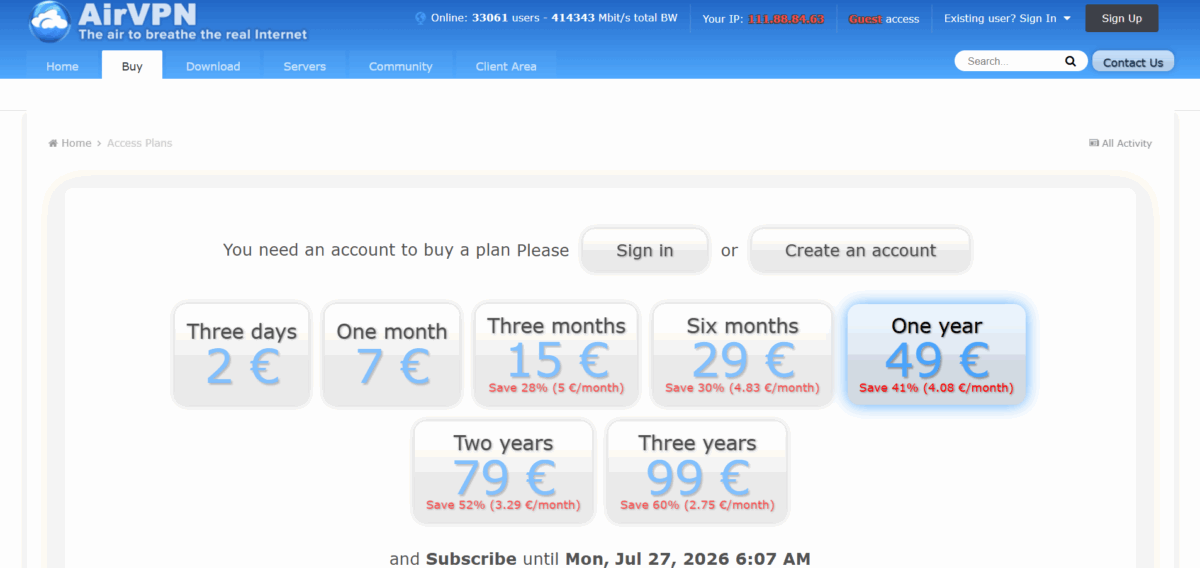
AirVPN’s pricing occupies that sweet spot where it is not dirt cheap, but it won’t overwhelm your bank account either. They keep it simple with only three subscription options available (none of that confusing tier nonsense). Like a little short-term flexibility? You can buy a three-day plan at $2.22—perfect for “testing the waters,” or just to have for a short business trip. It’s kind of like renting a car for the weekend instead of buying one. Now let’s see the math:
- Monthly plan: $7.76 per month. Okay, that is higher than some competitors out there, but you are paying for the handmade Italian privacy quality.
- Three-month plan: $5.54 per month (billed as $16.62). This is a decent middle ground if you aren’t ready to go long-term.
- Annual: $4.52 per month (billed as $54.33 once a year). This is where AirVPN starts to look like a pretty decent deal.
You want to save even more money? Before heading to checkout, hunt down some AirVPN coupon codes. They pop up pretty often and will save you some more dollars. But here’s the important thing: unlike some VPNs that reserve the best features for the premium tier, AirVPN provides you with everything from day one. OpenVPN, P2P support, kill switch protection, etc., are all included whether you are on the three-day trial or the annual plan.
So, the takeaway? You’re not paying for gimmicky marketing or celebrity endorsements. You’re paying for solid privacy tools that work. And the pricing matches that no-nonsense policy—fair, transparent, and with no surprise charges buried in the fine print.
Support
Let’s be honest about AirVPN’s support situation. We tested their support by emailing them a technical question with regards to the port forwarding setup.
Here was our experience:
- Email Response Time: 18 hours (not bad, but also not blazing fast either).
- Quality of Response: Very detailed and technical, but they assumed that we were already Linux command line experts.
- Follow-up Questions: It took another 24 hours before we could get a response for clarification.
The Good:
- Support staff know their stuff.
- Very detailed responses with step-by-step directions.
- Active community forums with users helping each other.
The Bad:
- No live chat (deal breaker for urgent issues).
- Overly technical responses for new users.
- Limited weekend response times.
Bottom Line: If you’re looking for hand-holding or immediate responses, then this is not the service for you. However, if you are happy with a slower email-based support and can wait, you can rest assured that their team is knowledgeable.
Real-World Use Cases
Who Should Use AirVPN?
After our thorough testing, here is who we would recommend AirVPN to:
A Great Option for:
- Privacy Enthusiasts: If your goal is anonymity first, it makes sense why AirVPN is focused on security, not user-friendliness.
- Torrenting Fans: Good P2P support and port forwarding options.
- Tech-Savvy Users: The complicated interface won’t cause you to run away.
- Budget Conscious Privacy Seekers: Reasonable privacy features without premium price tags.
Not A Good Option For:
- Streaming Fans: You will always be frustrated, having content blocked.
- VPN Newbies: You will need a lot of time to learn how to use it.
- Mobile Users: The interface is not mobile-friendly.
- Professional and Biz Owners: The lack of live support might cause you headaches.
The Key Takeaway: Are you cool with sacrificing user-friendliness and streaming functionality for better privacy options and pricing? If yes, you could consider AirVPN. If not, look for alternate options.
AirVPN vs. Top Competitors: Quick Comparison
| Feature | AirVPN | NordVPN | ExpressVPN | Surfshark |
|---|---|---|---|---|
| Monthly Price | $7.76 | $12.99 | $12.95 | $9.99 |
| Yearly Price | $4.52/month | $4.99/month | $6.67/month | $3.19/month |
| Server Count | 237 | 7,000+ | 3,000+ | 3,200+ |
| Countries | 23 | 100+ | 105+ | 100+ |
| Netflix Unblocking | ❌ | ✅ | ✅ | ✅ |
| Torrenting | ✅ | ✅ | ✅ | ✅ |
| Kill Switch | ✅ | ✅ | ✅ | ✅ |
| WireGuard Protocol | ❌ | ✅ | ✅ | ✅ |
| Live Chat Support | ❌ | ✅ | ✅ | ✅ |
| VPN over Tor | ✅ | ✅ | ❌ | ❌ |
Where it excels: AirVPN offers competitive pricing and some interesting features like VPN over Tor. But its server coverage and streaming capabilities lag the mainstream competitors.
Does AirVPN Work In China?

The short answer? Yes, but it’s going to take some technical know-how to make it happen. AirVPN used to have servers located in Hong Kong, but they were forced to take them down when China’s surveillance machine started breathing down their necks. Quite honestly, a smart move—what’s the point of keeping servers in a region where the government can look over your shoulder whenever they feel like it?
Here’s the truth about using a VPN in China: the “Great Firewall” is not just a catchy nickname; it’s an exact description of a high-tech censorship system that actively searches for and blocks VPN traffic faster than you can say “Tiananmen Square.” Most VPN services are detected and blocked in days (often hours). AirVPN has one additional advantage: OpenVPN over SSL.
What this means is that AirVPN is able to disguise the VPN traffic like regular HTTPS website traffic, making it almost impossible for Chinese ISPs to see it. It’s like wearing a great disguise in a crowd and blending in with every other normal internet user. Using the desktop client is fairly easy. You launch the AirVPN client, turn on the SSL mode, and you’re good to go. The app takes care of the technical work behind the scenes.
For mobile users, the hurdle is a bit higher. You’ll have to manually load the OpenVPN configuration file into a separate OpenVPN client app. It’s not hard, but it also isn’t as simple as just tapping on “connect.” Need assistance with getting it set up? AirVPN has support documentation that walks you through the process step-by-step. Just a fair warning – if you are not comfortable with working with manual configuration files, it may feel like trying to put together IKEA furniture with no photos.
Let’s be real: AirVPN may work in China, but even the ‘best’ VPN is not a guaranteed solution. The government’s censorship tools are always changing, and what works today may not work tomorrow. Always have a backup plan ready, and don’t rely on one VPN for all your access needs. Other services like NordVPN or ExpressVPN offer their built-in obfuscation modes that adapt to changes in the firewall automatically.
Our Unbiased Recommendation
Select AirVPN if you:
- Value privacy over everything else.
- Couldn’t care less about streaming geo-unblocking.
- Love fiddling around with advanced settings.
- Want to support an activist-driven company.
- Need advanced features like VPN over Tor.
Pass on AirVPN if you:
- Want to watch Netflix from other countries.
- Want plug-and-play simplicity.
- Need live customer support.
- Are new to VPNs and want a gentle learning curve.
Bottom line? AirVPN is not trying to be everything for everyone, and honestly, this is refreshing in a market full of “best VPN for everything” claims. It is a niche tool designed for a niche audience. If you are part of that audience, you will probably love it. If you are not, you will more than likely be frustrated within the first week.
All things considered, for the majority of people looking for a blend of privacy, performance, and usability, alternatives such as NordVPN or ExpressVPN will be better bets. However, if you want something truly different – a VPN that is built upon principles rather than profits – you should consider AirVPN.
Our Rating: 3/5 stars
Pros: Transparency, great privacy features, and committed to its mission.
Cons: Poor streaming performance, limited server network, and complex to use. It is a great VPN for the right person, just not everybody.
Final thought: Sometimes the best tool is not the most popular tool. AirVPN may not top the bestseller lists, but for the privacy-aware user who knows what they want, it does what it promises, but that doesn’t include watching Netflix while abroad.
Are you ready to try AirVPN? You can visit their official website to find pricing and a 3-day trial. Just keep in mind – this is not a VPN for everybody, and that is okay!
Are you looking for alternatives? See our reviews of NordVPN, ExpressVPN, and Surfshark – all more mainstream options that weigh privacy with everyday user concerns.
In Summary, the best VPNs in 2026 are;
| Rating | VPN Service | Get Offer |
|---|---|---|
| #1 Top Rated#1 | NordVPN - #1 VPN in the industry | FREE Trial |
| #2 Top Rated#2 | Surfshark - top budget VPN | Start Now |
| #3 Top Rated#3 | Proton VPN - best free VPN | Start Now |









