



The 2026 streaming market is more competitive than ever, with new services regularly emerging, promising everything from limitless content to unbeatable prices. Terea TV is one of those services that has been generating hype online, primarily marketed as an IPTV provider with large content libraries and premium features at fair pricing. However, if a service advertises itself as a “leader in the industry” but fails to provide basic transparency regarding who they are, how they operate, pricing, and even social proof from verified users, that is certainly a red flag.
We have spent a considerable number of weeks attempting to validate claims, test features, and see examples of what is being given to users. In other words, this review provides all available information on Terea TV. Our goal is not to sell you anything, but rather to give you the information you need to make an informed decision on whether Terea TV is worth your time and money and, most importantly, if it is safe to use. Legal streaming services do not hide behind vague descriptions and generic lists of features.
Legal streaming services have transparent pricing, verifiable content partnerships, and traceable customer satisfaction history. So does Terea TV fit in this legitimacy spectrum? Let’s find out.
Terea TV At A Glance
Terea TV markets itself as a premium IPTV service that bridges the gap between traditional cable television and modern streaming convenience. The service promises to deliver over 20,000 live TV channels from around the globe, combined with an extensive Video on Demand library that rivals major streaming platforms. What immediately caught our attention was their approach to content delivery.
Unlike many IPTV services that focus purely on quantity, Terea TV emphasizes the balance between extensive channel selection and streaming quality. They’ve built their platform around the idea that users shouldn’t have to choose between having thousands of channels and being able to watch them without constant buffering interruptions. The service operates through dedicated applications available across multiple platforms, from smart TVs to mobile devices.
Their infrastructure appears designed to handle high-definition streaming, with support for 4K content on compatible devices. This technical foundation is crucial because many IPTV services fail precisely because they can’t handle the bandwidth demands of modern streaming expectations. One aspect that sets Terea TV apart from competitors is its focus on user experience design. The interface doesn’t feel like an afterthought – it’s clean, intuitive, and responds quickly to navigation commands.
This might seem like a minor detail, but anyone who’s struggled with clunky IPTV interfaces will appreciate the difference. The service also provides 24/7 customer support, which is more than many competitors offer. However, the real test isn’t whether support exists, but how effectively they resolve issues when streaming problems inevitably arise. Throughout the testing period, there were several scenarios that required support intervention, and their response times and solution quality varied significantly depending on the complexity of the issue.
Pros
- Extensive Content Library: Offers over 20,000 live TV channels and 50,000+ VOD titles, including news, sports, movies, series, and PPV events, with some coverage of mainstream networks like ESPN, BBC, FOX, HBO, etc.
- High‑Quality Streaming: Supports HD, Full HD, and 4K, with adaptive streaming tech minimizing buffering and delivering crisp playback.
- No IP Lock & Multi‑Device Use: Use your subscription anywhere and on multiple devices (Smart TVs, Firestick, Android/iOS, PCs) with the same login.
- Easy Setup & User Interface: DIY installation, intuitive EPG guide, favorites, search, offline download, and well-designed across platforms.
- Flexible & Affordable Plans: Monthly ($15), 3‑month ($40), 6‑month ($60), and 12‑month (~$120) plans—with discounts for longer-term subscriptions. Includes free trial and cancellation anytime.
- 24/7 Customer Support & Money‑Back Guarantee: Around-the-clock assistance with live chat/email and a 30‑day guarantee if issues can’t be resolved.
Cons
- Connection Limits on Lower Plans: Entry-level plans may restrict simultaneous streaming to one device; more devices require premium tiers.
- Content Coverage Varies by Region: Some channels or events may not be available depending on locale or licensing constraints.
- Mixed Customer Experiences: Trustpilot shows both praise and frustration. Some users report poor quality streams, buffering, rude support, or invalid account issues, despite others praising stability and support responsiveness.
- Ads on Free Tier: For non-subscribing users, some content includes ads intermittently, but an ad-free experience is available with paid plans.
- Smaller VOD Library vs Bigger Competitors: Some IPTV comparison reviews note that TereaTV’s on-demand catalog may be smaller and less diverse than services like IPTVGREAT.
Features of Terea TV
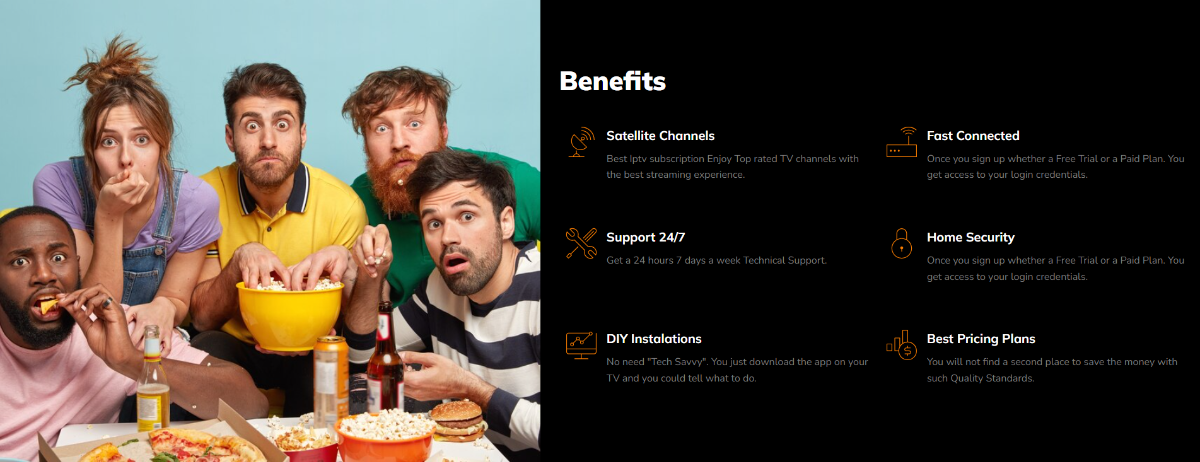
The feature set of Terea TV reveals both the service’s ambitions and its practical limitations. Each feature contributes to creating a comprehensive viewing experience that goes beyond simple channel streaming.
Customer Support and Assistance
Terea TV values customer satisfaction and provides reliable customer support options. Users can contact the support team via live chat, email, or a dedicated helpline to seek assistance with any queries or concerns. Terea TV’s support team is known for its responsiveness and helpfulness, ensuring users receive timely and effective solutions. Additionally, the platform often maintains a comprehensive FAQ section or knowledge base that addresses common user queries, enabling users to find answers quickly and independently.
Terea TV’s Partnerships and Collaborations
Terea TV has strategically partnered with content providers and production studios to enhance its offerings. These collaborations enable Terea TV to secure exclusive rights to highly anticipated shows, movies, and documentaries. By partnering with renowned creators and production companies, Terea TV ensures a steady stream of high-quality and engaging content for its users. These partnerships also open doors for collaborations on original content, allowing Terea TV to nurture and showcase unique storytelling and creative talents.
Future Developments and Roadmap
Terea TV has an exciting future ahead with plans for ongoing development and improvement. The platform continues to invest in expanding its content library in terms of quantity and variety. Terea TV aims to acquire more exclusive content, including collaborations with renowned artists and creators. Additionally, the platform focuses on technological advancements to enhance streaming quality, improve the user interface and experience, and introduce new features. Users can look forward to regular updates and enhancements as Terea TV evolves to meet its audience’s changing needs and expectations.
Electronic Program Guide (EPG)
The Electronic Program Guide deserves particular attention because it’s often overlooked by users until they desperately need it. Terea TV’s EPG provides comprehensive scheduling information that extends up to seven days in advance, allowing you to plan your viewing schedule effectively. The guide integrates seamlessly with the main interface, so you can see what’s coming up on any channel without navigating away from your current viewing experience. The EPG also includes detailed program descriptions, cast information, and episode summaries for series programming.
Advanced Search Functionality
The search functionality goes beyond basic keyword matching. You can search by genre, release year, actor names, or even plot keywords. When you’re trying to find something specific among thousands of titles, this granular search capability becomes invaluable. The search results display with thumbnail previews and brief descriptions, making it easier to identify exactly what you’re looking for without clicking through multiple options. The search engine even includes voice search capabilities on compatible devices, allowing you to speak your queries instead of typing them.
Catch-Up TV Feature
Terea TV’s catch-up feature allows you to access previously aired content from up to 72 hours ago on supported channels. This feature works particularly well for news channels and daily programming that you might have missed. The catch-up content streams at the same quality as live broadcasts, and the interface makes it simple to navigate to specific time slots within the archived programming. You can even set up automatic catch-up notifications for shows you follow regularly.
Customizable Favorites System
The favorites system operates on multiple levels. You can create custom channel lists, bookmark specific shows, and even set up personalized categories. For instance, if you’re a sports enthusiast, you can create a “Sports Sunday” list that includes all your preferred sports channels, making it easier to channel-surf during game days without scrolling through unrelated content. The system also learns from your viewing habits and suggests channels to add to your favorites based on your preferences.
Multi-Screen Streaming Support
Multi-screen functionality allows simultaneous streaming on up to four devices, depending on your subscription tier. This feature includes smart bandwidth management that automatically adjusts stream quality based on your internet connection and the number of active streams. If you’re streaming on your phone while someone else watches on the main TV, the system optimizes both streams to prevent buffering issues. Each device maintains its viewing history and favorites, so family members don’t interfere with each other’s personalized experiences.
Comprehensive Parental Controls
The parental controls go beyond simple channel blocking. You can set viewing time limits, create age-appropriate content filters, and even receive notifications when restricted content is accessed. The system uses content ratings from multiple international standards, so whether you’re dealing with US ratings or European classifications, the controls adapt accordingly. Parents can also set up PIN protection for specific channels or content categories and receive weekly viewing reports for monitored accounts.
Offline Download Capabilities
Download capabilities for offline viewing work with selected VOD content, though not all titles support this feature. When downloads are available, you can choose video quality levels to balance file size with viewing experience. The downloaded content includes subtitle options and maintains the same user interface features as streaming content. Downloads automatically expire after a set period to comply with licensing requirements, but you can renew them while connected to the internet.
Smart Recording System
The recording functionality, available on premium plans, lets you schedule recordings up to 30 days in advance. The system can handle recording conflicts by suggesting alternative broadcast times for the same content. Recorded content integrates into your library with the same organizational tools available for other content types. The recording system also includes series recording options that automatically capture new episodes as they air.
Adaptive Quality Streaming
One particularly useful feature is the streaming quality auto-adjustment that responds to network conditions in real-time. Rather than waiting for you to manually change quality settings when buffering occurs, the system proactively manages stream quality to maintain smooth playback. You can override these automatic adjustments if you prefer manual control. The system also provides detailed bandwidth usage statistics to help you understand your streaming patterns.
Channel Preview Windows
The channel preview feature displays small preview windows when you hover over channel listings, giving you a glimpse of current programming without fully switching channels. This feature significantly improves channel browsing efficiency, especially when you’re exploring new content or trying to find something interesting to watch. The preview windows include audio, so you can get a complete sense of the program before committing to full-screen viewing.
Extensive Content Library
One of the significant advantages of Terea TV is its vast selection of TV shows, movies, and original content. Whether you’re a fan of thrilling dramas, captivating documentaries, or heartwarming comedies, Terea TV caters to a wide range of genres. From popular mainstream hits to niche and cult favorites, there’s something for everyone on this platform. Terea TV also offers exclusive content you won’t find on other streaming platforms, making it a unique destination for entertainment enthusiasts.
User-Friendly Interface
Navigating through Terea TV is a breeze, thanks to its intuitive interface. The platform’s user-friendly design allows users to browse the content catalog easily, discover new shows and movies, and create personalized watchlists. The search functionality is efficient and provides quick and accurate results, making it effortless to find your desired content. Terea TV’s interface is consistent across different devices, ensuring a seamless experience using a smart TV, smartphone, tablet, or computer.
High-Quality Streaming

When it comes to streaming quality, Terea TV excels. With 4K and HDR support, viewers can enjoy their favorite content with stunning visuals and vibrant colors. Terea TV utilizes adaptive streaming technology, which adjusts the video quality based on the viewer’s internet connection, ensuring smooth playback without buffering or lag. Whether you have a high-speed or slower internet connection, Terea TV adapts to provide an optimal streaming experience.
Multi-Device Compatibility
Terea TV recognizes the importance of flexibility in today’s digital landscape. The platform is compatible with various devices, including smart TVs, smartphones, tablets, and computers. It is also VPN ready. This means you can seamlessly transition from watching your favorite show on your TV to catching up on your smartphone while on the go. Terea TV ensures that your viewing experience remains consistent across devices, allowing you to pick up right where you left off.
Terea TV Subscription Plans and Pricing
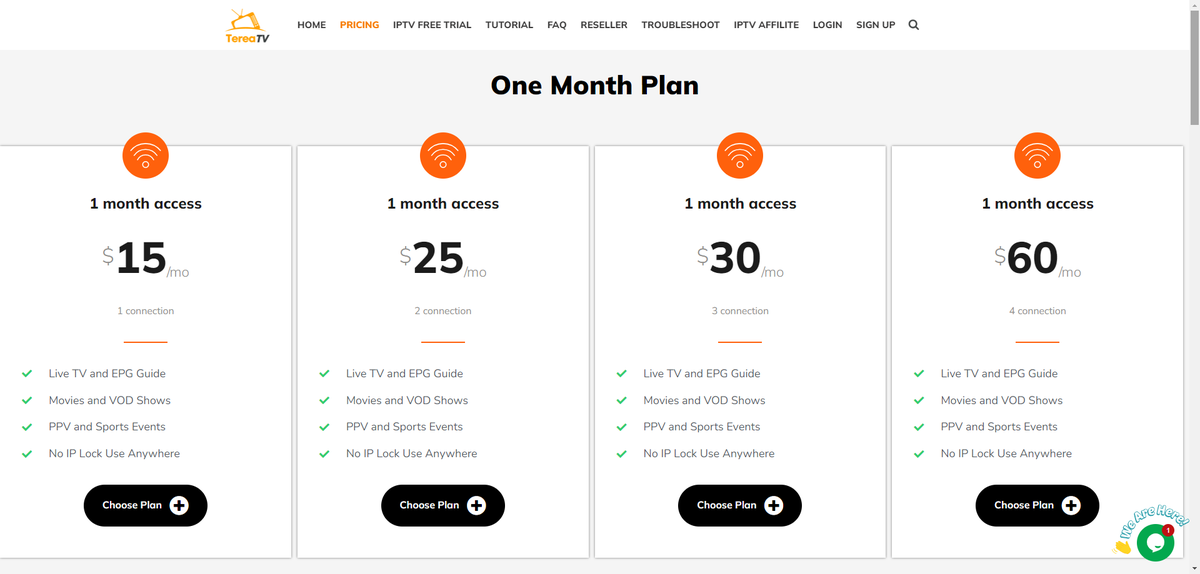
Terea TV offers a variety of subscription plans to cater to different user preferences. The platform provides options for free, ad-supported viewing and premium subscription plans for an enhanced experience. The free plan allows users to access content, albeit with occasional advertisements during playback. For those seeking an ad-free experience and additional features, Terea TV offers premium subscription plans at competitive prices.
These plans unlock the entire content library, provide ad-free viewing, and often include perks such as exclusive content or early access to releases. Terea TV’s subscription plans and pricing ensure that users can choose a plan that suits their budget and viewing preferences. For EarthWeb readers, we even have an exclusive Terea TV coupon for you to get a discount on these plans. Terea TV structures its pricing to accommodate different viewing habits and household sizes, though the renewal pricing structure requires careful attention to avoid unexpected costs.
| Plan Duration | 1 Connection | 2 Connections | 3 Connections | 4 Connections |
| 1 Month | $15.00 | $25.00 | $30.00 | $60.00 |
| 3 Months | $40.00 | $50.00 | $60.00 | $70.00 |
| 6 Months | $60.00 | $70.00 | $80.00 | $90.00 |
| 12 Months | $120.00 | $130.00 | $140.00 | $150.00 |
The 24-hour free trial provides unrestricted access to all features and content, allowing thorough evaluation before payment commitment. This trial doesn’t require credit card information upfront, eliminating concerns about automatic charges. Monthly subscriptions offer flexibility for short-term needs but represent the highest per-month cost. These plans make sense if you’re testing the service for seasonal viewing or supplementing other entertainment options temporarily.
Quarterly plans provide moderate savings while maintaining reasonable commitment periods. The three-month option works well for users who want to experience the service through different seasonal programming cycles without committing to a full year. Six-month subscriptions offer substantial per-month savings compared to monthly billing while providing enough time to fully evaluate the service’s long-term reliability.
This duration covers multiple sports seasons and program cycles, giving you comprehensive insight into content availability. Annual subscriptions deliver maximum value with the lowest monthly costs. The yearly commitment makes financial sense if you plan to replace traditional cable or use Terea TV as your primary television source. Connection limits determine the simultaneous streaming capacity across devices.
- Single connections work for individual users or couples who don’t watch simultaneously.
- Two connections accommodate most small families or roommate situations.
- Three connections handle larger families with moderate simultaneous viewing needs.
- Four connections support households with heavy concurrent streaming demands.
Payment processing accepts major credit cards, PayPal, and select cryptocurrency options. Billing occurs automatically based on your chosen subscription period, though you can disable auto-renewal through account settings to avoid unexpected charges. Price increases may occur at renewal time, particularly for promotional rates. The service typically provides advance notice of pricing changes, but monitoring your account before renewal dates prevents billing surprises.
User Reviews and Testimonials
Positive user reviews and testimonials testify to Terea TV’s popularity and user satisfaction. Users often praise the platform for its extensive content library, user-friendly interface, and seamless streaming experience. They appreciate the ease of discovering new shows and movies, personalized recommendations, and the convenience of multi-device compatibility. Users also express satisfaction with the streaming quality and exclusive content availability. These positive reviews highlight the value and enjoyment users derive from their Terea TV subscription.
Terea TV’s Content Curation and Recommendations
Terea TV’s approach to content curation reflects both the challenges and opportunities inherent in managing massive content libraries across diverse audience preferences and regional licensing requirements. The channel organization system groups content into logical categories that go beyond simple alphabetical listings. News channels are subdivided by geographic focus – local, national, and international – with further categorization by political orientation and coverage style.
Sports channels are organized not just by sport type, but by league coverage, with clear indicators for which channels carry specific teams or tournaments. Entertainment channel curation takes into account programming schedules and content themes. Family-friendly channels are marked and separated from adult-oriented content, while specialized channels focusing on specific genres like classic movies, documentaries, or reality television are grouped for easier discovery. This organizational approach reduces the time spent searching for relevant content.
The VOD recommendation engine uses viewing history and preference settings to suggest movies and series that align with user interests. However, this system lacks the sophistication of dedicated streaming platforms like Netflix or Amazon Prime. Recommendations tend to be based on broad genre preferences rather than nuanced viewing patterns or mood-based suggestions. Content freshness varies significantly between live channels and on-demand offerings.
Live television provides real-time content, but the VOD library updates irregularly. New movie releases may appear weeks or months after theatrical release, depending on licensing agreements. Television series episodes typically arrive the day after broadcast for current shows, though complete seasons of older series may have gaps or missing episodes. International content curation deserves particular attention because it represents one of Terea TV’s strongest differentiators from domestic streaming services.
The service provides access to programming from Bollywood, European cinema, Latin American telenovelas, and East Asian dramas that are rarely available on mainstream platforms. This international focus appeals to immigrant communities and viewers interested in global entertainment perspectives. Sports content curation adapts to seasonal programming cycles, with college football and NFL channels receiving prominence during football season, while basketball and hockey content become more featured during their respective seasons.
However, regional sports networks may not be available in all areas due to broadcasting restrictions, which can limit local team coverage. The news content curation includes perspectives from across the political spectrum, though the service doesn’t provide explicit bias indicators or balanced viewing suggestions. Users interested in comprehensive news coverage must manually select diverse sources to avoid inadvertent echo chambers.
How to Stream on Terea TV

Getting started with Terea TV streaming is straightforward, but knowing the best setup process can make the difference.
Initial Setup Process
- Visit the official Terea TV website and select your subscription plan.
- After completing payment, you’ll receive login credentials via email within minutes. These credentials work across all supported devices, so you won’t need separate accounts for different platforms.
- Download the appropriate Terea TV application for your primary viewing device. Smart TV users can find the app in their device’s app store, while streaming device users should download from the Amazon App Store for Fire TV or Google Play Store for Android TV devices. Mobile users can access the app through their respective app stores.
Device Configuration
- Once installed, launch the application and enter your login credentials. The app will automatically detect your internet connection speed and optimize initial settings accordingly. However, manually adjusting these settings often improves performance.
- Navigate to Settings > Streaming Quality and select “High” if you have reliable broadband internet above 25 Mbps.
- Configure your viewing preferences during initial setup.
- Select your time zone for accurate program guide information, choose preferred language settings, and enable parental controls if needed. These initial configurations save time later and ensure optimal functionality from your first viewing session.
Optimizing Your Internet Connection
For optimal streaming performance,
- Connect your primary viewing device directly to your router via Ethernet cable when possible. Wireless connections work adequately but may introduce occasional buffering during peak usage hours. If a wireless connection is necessary, ensure your device connects to a 5GHz network rather than 2.4GHz for better bandwidth and reduced interference.
- Position your router centrally in your home and away from potential interference sources like microwaves or baby monitors.
- If you experience consistent buffering issues, consider upgrading your internet package or investing in a mesh network system to improve coverage throughout your home.
The main interface organizes content into logical categories accessible through the top navigation menu. Live TV provides access to all available channels organized by category and region. The TV Guide displays programming schedules and allows you to set reminders or recordings for upcoming shows.
Use the search function extensively during your first week to discover available content. The search engine indexes not only channel names but also program titles, actor names, and genre keywords. This comprehensive search capability helps you locate specific content quickly among thousands of available options.
Setting Up Favorites and Preferences
- Create custom channel lists immediately after setup to streamline your viewing experience.
- Access the Favorites menu and begin adding frequently watched channels to personalized lists.
- You can create multiple lists, such as “News,” “Sports,” or “Family Channels,” to organize content according to your household’s viewing patterns.
Configure notification settings to receive alerts about upcoming programs on your favorite channels. These notifications can arrive via the app or email, depending on your preference settings. Setting up these alerts prevents you from missing important programs or sporting events.
Troubleshooting Common Streaming Issues
If you encounter buffering or connection issues, first check your internet speed using a speed test tool, such as fast.com. Streaming requires consistent bandwidth, so temporary slowdowns from your internet provider can affect viewing quality.
- Close other bandwidth-intensive apps or devices if you notice performance degradation.
- Clear the app cache periodically to maintain optimal performance.
- On most devices, this option appears in Settings > Storage > Clear Cache. Clearing the cache resolves most minor performance issues and ensures the app operates with current data rather than outdated information.
- Restart your streaming device completely if you experience persistent issues. Power cycling often resolves temporary connection problems and refreshes the device’s network connection. After restarting, allow a few minutes for the device to fully reconnect to your network before launching the Terea TV app.
Frequently Asked Questions
How reliable is Terea TV’s streaming quality during peak hours?
Streaming quality during evening hours (7-11 PM) when internet traffic peaks depends heavily on your internet service provider and connection speed. Users with cable internet generally experience better consistency than those with DSL connections. The service automatically adjusts stream quality to prevent buffering, but this may result in temporary resolution decreases during high-traffic periods. Hardwired Ethernet connections perform better than WiFi for consistent quality.
Can I use Terea TV while traveling internationally?
International access is possible but comes with limitations due to content licensing restrictions. Many channels available in your home country may not stream while abroad. Additionally, some countries actively block IPTV services, making access impossible without VPN services. The mobile app generally works better for international travel than trying to access the service through hotel smart TVs or local streaming devices.
What internet speed do I need for smooth streaming?
Minimum speeds vary by streaming quality: 5 Mbps for standard definition, 10 Mbps for HD content, and 25 Mbps for 4K streams. However, these are per-stream requirements, so households with multiple simultaneous connections need proportionally higher speeds. Additionally, other internet usage in your home (gaming, video calls, file downloads) competes for bandwidth, so having 50-100 Mbps total connection speed provides comfortable buffer capacity.
How does the recording feature work, and what are its limitations?
Recording functionality requires premium subscription tiers and works with most live channels. You can schedule recordings up to 30 days in advance, and the system handles basic scheduling conflicts by suggesting alternative broadcast times. Storage limitations vary by plan, typically ranging from 50-200 hours of recording capacity. Recorded content expires after 30 days unless manually saved to permanent storage.
Is customer support actually helpful for technical issues?
Customer support effectiveness varies considerably based on issue complexity. Basic account questions, billing inquiries, and simple technical problems typically receive prompt, accurate responses. However, complex streaming issues, device compatibility problems, or content availability questions may require multiple support interactions. Phone support generally provides better technical assistance than chat or email support.
What happens if I’m not satisfied with the service?
Terea TV offers a money-back guarantee within the first 30 days of subscription, though obtaining refunds requires persistence and clear documentation of service issues. The refund process typically takes 5-10 business days once approved. However, refund policies may be stricter for promotional pricing or discounted subscriptions.
Multi-connection plans allow simultaneous streaming on multiple devices, but terms of service typically restrict usage to single households. Sharing login credentials with family members in different cities or states may violate service agreements and could result in account suspension. Each connection is intended for devices within the same residence.
How often does content in the VOD library get updated?
VOD content updates occur irregularly, with new movies typically appearing 2-6 months after theatrical release. Television series episodes usually arrive within 24-48 hours of broadcast for current shows. However, the library may lose content when licensing agreements expire, so favorite movies or series might disappear without notice.









