Eyezy is a tool designed to give you oversight and control over smartphone usage, providing a window into digital activities.
Whether you’re a parent looking to ensure the online safety of your children or you simply want to monitor the way a phone in your care is being used, Eyezy offers a suite of features to keep you informed.
It operates stealthily, recording activities such as social media usage, call logs, and text messages without alerting the user of the device.
How Does Eyezy Work?
Designed for both iPhone and Android devices, Eyezy is easy to install and operate.
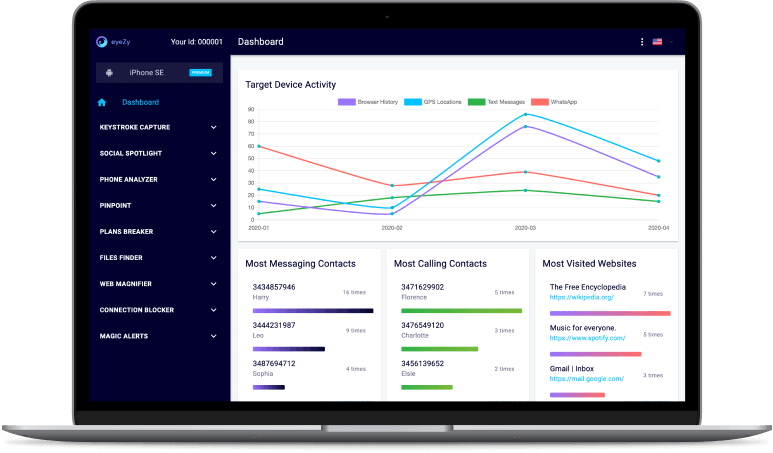
Once installed, the app works in the background, gathering data and sending it to your personalized dashboard.
Installation & Setup:
- Download : Get the Eyezy app from their official website.
- Install : Install it onto the phone you wish to monitor.
- Configure : Follow the setup instructions to customize the app for your needs.
Features:

- Invisibility: The app icon is hidden, meaning it won’t be visible on the phone, keeping monitoring discreet.
- Data Access: You can view texts, call logs, and browse internet history.
- Social Media: Eyezy offers the ability to monitor activities on popular social media apps.
To access the collected information, simply log into your Eyezy account.
The data is presented in an organized way, allowing you to quickly understand your child’s phone usage patterns.
Usability:
- User-Friendly Interface: Navigate through information with ease.
- Real-Time Updates: The app sends you updates regularly.
- Compatibility: Fits into the digital lifestyle of modern families.
By using Eyezy, you gain insight into your child’s digital life, helping you ensure their safety and well-being.
It is important to strike a balance between keeping track of your child’s activities and respecting their privacy.
Installation and Setup
Eyezy is designed to be user-friendly, with a straightforward installation and setup process that allows you to quickly start monitoring a target phone.
Here’s what you need to know to get Eyezy up and running.
Compatibility
Before installing Eyezy, confirm that your target device is compatible.
Eyezy supports:
- iOS: Devices running various versions of iOS. For the latest compatibility information, please check Eyezy’s official website.
- Android: Most smartphones and tablets running Android. The compatibility range covers several Android versions, but always verify with the latest updates from Eyezy.
Installation Process
To install Eyezy on the target device, follow these steps:
- Create an Account: Sign up for an Eyezy account to get started.
- Choose a Subscription: Select the plan that suits your needs.
- Install the App:
- For non-jailbroken iOS devices, installation may require iCloud credentials.For jailbroken iOS devices, direct installation on the device is possible.For Android devices, physical access to the target device is necessary for app installation.
Getting Started

Once Eyezy is installed:
- Access the Dashboard: Log in to your Eyezy account on a web browser to view the dashboard.
- Monitor Activities: The dashboard will display various activities from the target device such as messages, calls, social media use, and more.
- Customize Settings: Tailor the app settings to match your monitoring needs.
Remember, it’s crucial to follow local laws and regulations regarding privacy and monitoring when using spy or parental control apps like Eyezy.